Do you have a handle on your network traffic? If you’re only choosing to block or allow websites by URL, that may not be enough. Today, you need the ability to control traffic at the application level. Enter Application Control.
Application Control helps you wrangle productivity drains, bandwidth hogs and protocol-agile apps used for filter bypass. It works in concert with Web Filter, SSL Inspector, Bandwidth Control and Policy Manager to give you the tools you need to enforce your use policy and see where your bandwidth dollars are being spent. Make sure that your users can access mission-critical, cloud-based apps (like CRM, ERP) while keeping recreational or inappropriate apps off the network.
Application Control performs deep packet (DPI) and deep flow (DFI) inspection of network traffic, enabling it to accurately identify thousands of common applications such as social networking, P2P, instant messaging, video streaming, file sharing, enterprise applications and much more. Simply check “block” for anything you want to stop, and Application Control will take care of the rest. If you need a higher degree of control, you can use the Integrated Rules EngineTM to create custom rules to target more complex traffic patterns.
Features
Block, flag or allow apps based on your rules.
Handle proxies like Ultrasurf that are used to circumvent your controls.
Get control of BitTorrent, streaming media and games that suck resources, provide distractions and could even introduce malware.
Set time-based controls by user on social networks or video websites, or simply block them completely.
Use fine-grain controls to go beyond block/allow for websites; i.e., enable the marketing team to access Facebook for social media posts, but block Facebook games and videos.
350 applications can be detected, ranging from social applications like Facetime and Slack, to adult-content applications like Pornhub, Youporn and 4chan.
Get Application Control
30-Day Free Trial
Control access to applications, which can be productivity drains and bandwidth hogs.
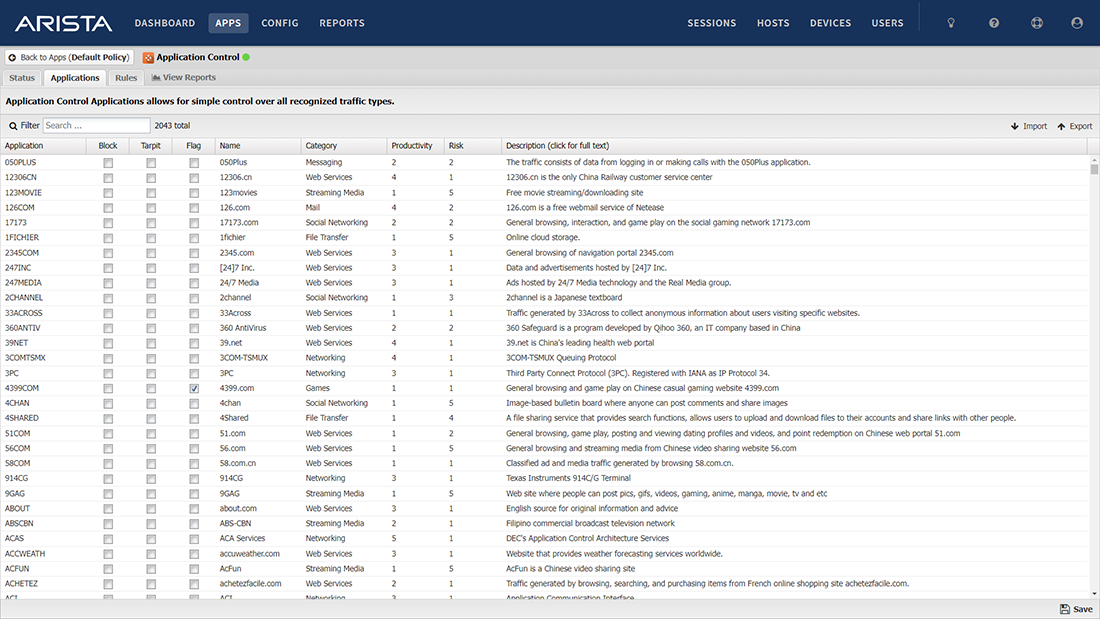
Control access to applications, which can be productivity drains and bandwidth hogs.
We have been using NG Firewall for the last few years and love it. Ranga Subasinghe, Huntingtower School
NG Firewall is the easiest solution we could find. David Matakas, KECdesign


Application Control Lite App
Application Control Lite provides signature-based layer 7 filtering allowing you to block messaging, gaming and other apps on your network. Write custom signatures for any protocol, and conserve bandwidth by blocking applications like peer-to-peer that open multiple TCP ports. Learn More.
Features
Select the protocol signatures to log or block.
Protection on the most common email protocol: SMTP.
Reporting lets you see which protocols are active on your network and who is using them.
Application Control Lite does not require a paid subscription. Install a free trial of NG Firewall to use every app in NG Firewall for 30 days. After your free trial, you will be able to continue to use this app without a paid subscription.